
PDF and DJVU Reader - Google Play
You'll be able to see results in few seconds.
Publisher Description

Are you looking for best PDF reader? This is more than just another PDF reader!
Are you looking for best PDF reader?
This is it. It is more than just another PDF reader!
Our software is not only PDF reader, but also DjVU, XPS, EPUB, MOBI, RTF, FB2 (including zipped) and even CBR and CBZ. More formats to come.
Since version 2.2.1 we add experimental Text-To-Speech support.
Now all your favorite books & comics will always be with you in one place.
Unleash whole power of your device with hardware-accelerated OpenGL rendering, including Olen GL ES 2.0 and 3.0 optimizations for improved speed and smoothness of reading.
New versions provide more flexible font mapping for PDF documents:
- If an external font is found in the same folder with document, this font will be applied.
- Also, user can define a list of directories (/sdcard/fonts by default) where external fonts can be found.
- If an external font in a PDF document has the same family name as one of the font found in these directories or in local book directory, the found font will be applied.
- Otherwise, the appropriate NimbusL font will be used.
You need work with 2, 3 or even more documents at the same time - no problem. Our software supports multiple documents with instant switching between them. Amount of documents depend of available RAM.
Do you have Samsung device with multi-window OS? This reader support it!
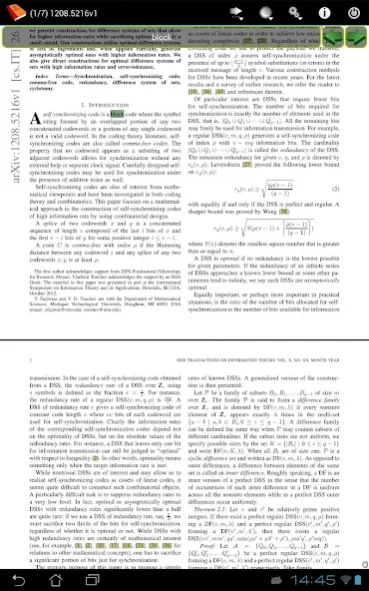
Do you need comment your document? Easy. Enable edit mode and use long tap to activate freehand notes, text highlight and more.
Create text notes/diary pages while reading bood and export all of them as separate document.
Reading book on foreign language? We do support external dictionaries! Just configure!
We do have page turning emulation - just switch to single page mode and choose page turning effect of your choice!
No extra permissions required, only access to a storage card.
You can be absolutely sure that none of your confidential information will be leaked to the Internet.
Try our unique features:
- Various viewing modes including single page and horizontal scroll ones.
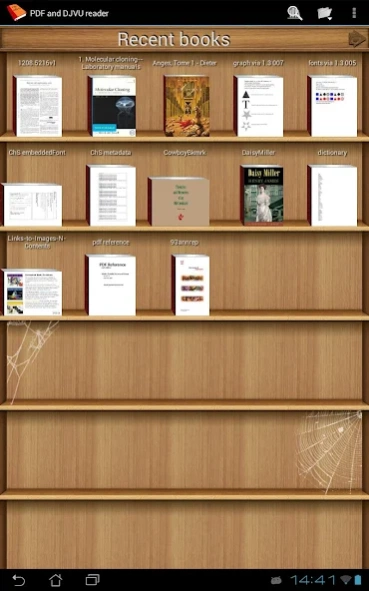
- Auto-scanning device storage and removable media.
- Search for books and search inside books (including DjVU).
- Night mode for comfortable text reading.
- Auto-splitting double-page spreads in two separate pages (including right-to-left scans).
- Cropping - no more wasting of your screen space.
- Automatic and manual cropping modes available.
- Bookmarking with custom titles.
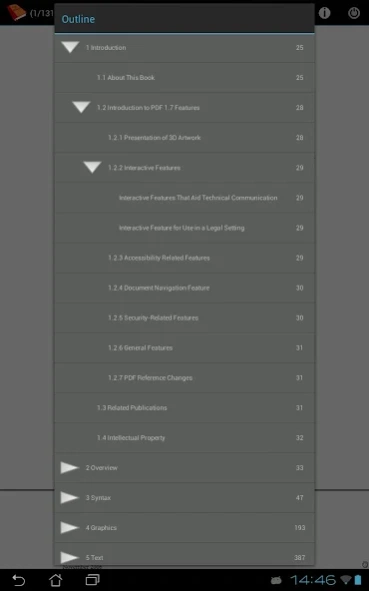
- Tree-like outline.
- Home screen widget for your recent books.
- Real full screen for Android 4.4
A lot of various preferences allowing you to customize reader as you wish.
This application is a donation version of EBookDroid.
If you like EBD and want to support, please buy this app.
About PDF and DJVU Reader
The company that develops PDF and DJVU Reader is AK2. The latest version released by its developer is 1.0 .
To install PDF and DJVU Reader on your Android device, just click the green Continue To App button above to start the installation process. The app is listed on our website since 2021-09-16 and was downloaded 0 times. We have already checked if the download link is safe, however for your own protection we recommend that you scan the downloaded app with your antivirus. Your antivirus may detect the PDF and DJVU Reader as malware as malware if the download link to org.pdf.and.djvu.reader is broken.
How to install PDF and DJVU Reader on your Android device:
- Click on the Continue To App button on our website. This will redirect you to Google Play.
- Once the PDF and DJVU Reader is shown in the Google Play listing of your Android device, you can start its download and installation. Tap on the Install button located below the search bar and to the right of the app icon.
- A pop-up window with the permissions required by PDF and DJVU Reader will be shown. Click on Accept to continue the process.
- PDF and DJVU Reader will be downloaded onto your device, displaying a progress. Once the download completes, the installation will start and you'll get a notification after the installation is finished.
Program Details
System requirements
Download information
Pricing
Version History
version
posted on 2021-09-16
Updated up to EBookDroid 2.7.4.1
version
posted on 2021-09-12
Updated up to EBookDroid 2.7.4
version
posted on 2021-03-24
Updated up to EBookDroid 2.7.3.1
version
posted on 2021-02-07
Updated up to EBookDroid 2.7.3
version
posted on 2020-09-12
Bookshelf settings fixed
version
posted on 2018-11-18
Updated up to EBookDroid 2.6.3
version
posted on 2018-01-09
- Updated up to EBookDroid 2.5.1
version
posted on 2016-06-01
- Updated up to EBookDroid 2.4.0.x,- OPDS browser added,- SMB browser added
version 1.0.2
posted on 2013-01-14
Several fixes and updates
Disclaimer
Official Google Play Link
We do not host PDF and DJVU Reader on our servers. We did not scan it for viruses, adware, spyware or other type of malware. This app is hosted by Google and passed their terms and conditions to be listed there. We recommend caution when installing it.
The Google Play link for PDF and DJVU Reader is provided to you by apps112.com without any warranties, representations or guarantees of any kind, so access it at your own risk.
If you have questions regarding this particular app contact the publisher directly. For questions about the functionalities of apps112.com contact us.
